PoE Power Budget Calculator for Security Cameras
Calculate a reliable PoE power budget for security cameras using device demand, port limits, switch capacity and design headroom.
By Maxsol Team

A PoE power budget for cameras is the combined power required by every device that may operate at the same time, plus sensible spare capacity. It must fit within both the switch’s total PoE budget and the power limit of each individual port.
A useful PoE power budget calculator for cameras therefore needs more than a camera count. Record each device’s power requirement, check its PoE class and port limit, total the simultaneous load, then reserve headroom for peak operating conditions and future changes.
Collect each device power requirement
Start with a device schedule rather than an estimate based on “typical camera power”. The demand can differ materially between fixed, PTZ, infrared, multi-sensor and heated camera models. A camera may also draw more power when its IR illumination, pan-and-tilt mechanism, heater or other features are active.
For every powered device, record the following information from its manufacturer documentation:
| Item to record | Why it matters |
|---|---|
| Device name and location | Helps installers trace the correct cable run and switch port |
| Quantity | Establishes the total connected load |
| Maximum power requirement | Forms the basis of the budget calculation |
| PoE standard or class | Confirms whether the camera and switch can negotiate power |
| Maximum input power | Important where this differs from the device’s normal operating figure |
| Intended switch port | Identifies any ports needed for higher-power devices |
| Cable route and approximate length | Supports cable and voltage-drop checks |
| Peak-load features | Covers IR, PTZ movement, heaters, wipers, microphones or accessories |
Use the manufacturer’s maximum specified input power where possible, especially for critical surveillance coverage. A lower day-time consumption figure may be useful for operational monitoring, but it should not be the only number used to size the switch.
Also include every PoE-powered device, not just cameras. Wireless access points, intercoms, door controllers, PoE extenders and network bridges can all consume part of the same switch budget.
Consider source power and device power separately
PoE is negotiated between the power sourcing equipment (PSE), such as a PoE switch, and the powered device (PD), such as a camera. The wattage available at a switch port is not automatically the wattage that reaches the device after cable losses.
This does not mean every installation needs complex cable-loss calculations. It does mean the camera, cable run, standard and switch port must be checked as one system. Long copper runs, poor terminations, unsuitable cable and non-standard equipment can reduce the practical margin available.
For a robust design:
- use the camera manufacturer’s stated PoE requirement;
- confirm its supported IEEE PoE standard;
- confirm the assigned switch port supports that standard and power level;
- keep permanent links and patch leads within the applicable structured-cabling design limits;
- investigate unusually long runs rather than assuming a higher-wattage switch alone solves the issue.
Separate per-port limits from total budget
A switch can have enough total power in theory while still being unable to power a particular camera from the selected port. Conversely, a switch may offer a high per-port capability on a small number of ports but not enough aggregate capacity to run every device at its maximum demand.
Treat these as two separate checks.
1. Per-port power limit
For each camera, compare its required PoE input with the maximum power supported by the intended switch port. Also verify the IEEE standard is compatible.
For example, IEEE 802.3af, 802.3at and 802.3bt are different PoE standards with different power capabilities. Do not assume that a camera needing a higher PoE class will work on an 802.3af-only port, even when unused total budget remains elsewhere on the switch.
A high-power camera should be assigned deliberately. Avoid placing it on a port simply because that is where the nearest patch lead happens to terminate.
2. Total switch PoE budget
The total PoE budget is the amount of power a switch can allocate across its PoE ports. Add all simultaneous device requirements and compare the result with this stated budget.
It is important not to confuse the following:
- Port count: how many devices can physically connect;
- Per-port limit: the maximum support available to one device on one port;
- Total PoE budget: the total power that can be allocated across the switch;
- Internal power supply rating: a component rating that should not automatically be treated as the published allocatable PoE budget.
A 16-port switch, for instance, does not necessarily have enough PoE power for 16 cameras at every port’s maximum rating. The total budget remains the controlling figure once multiple devices are connected.
Add simultaneous load and headroom
The core calculation is straightforward:
Total simultaneous PoE load = sum of the maximum demand of every device that may be active together
Then apply a headroom allowance:
Required design budget = total simultaneous PoE load × (1 + headroom)
For a 25% planning allowance, multiply the simultaneous load by 1.25. The right allowance depends on the installation, but the principle is consistent: do not specify a switch that is expected to operate permanently at its published maximum budget.
Headroom helps accommodate:
- night-time IR activation across multiple cameras;
- PTZ movement or other intermittent high-load functions;
- newly installed cameras or access devices;
- a camera replacement with a higher power requirement;
- normal uncertainty where documentation gives a range rather than a clear maximum;
- design changes made after the initial survey.
Headroom is not a substitute for compatibility. A camera that needs a higher-power PoE standard cannot be made compatible with an unsuitable port merely by leaving spare watts in the total budget.
Choose a headroom policy appropriate to the site
A small, fixed-camera system with fully documented devices may use a modest planned margin. A site with PTZ cameras, infrared lighting, exposed outdoor equipment or likely expansion benefits from more reserve.
Write the chosen allowance into the design documentation. This makes procurement and commissioning clearer and prevents later changes from silently consuming all available capacity.
Work through a neutral calculation method
A repeatable method is more useful than a one-off calculation because it can be updated when a camera is added, moved or replaced.
Step 1: Build a powered-device schedule
List every camera and other PoE device. For each row, enter the manufacturer’s maximum stated power requirement, PoE standard and proposed switch port.
Do not replace this list with an average watts-per-camera figure. Mixed camera estates are common, and a single higher-demand device can determine the choice of port or switch.
Step 2: Check each proposed port
For every row, ask:
- Does the port support the camera’s required IEEE standard?
- Is the port’s stated maximum output sufficient?
- Is the planned cable run suitable for the design?
- Are any high-power ports reserved for the devices that need them?
Resolve any failed port check before looking at the overall budget.
Step 3: Sum devices that can run together
Add the maximum requirement for all devices expected to operate concurrently. In most surveillance systems, assume every camera can be active at once. A security event can occur anywhere on site, and night-time modes can engage across the estate together.
If different operating modes genuinely cannot overlap, document why. Do not rely on assumed diversity without a clear technical basis.
Step 4: Apply design headroom
Multiply the simultaneous load by the selected headroom factor. If the switch has a 120W total PoE budget and your policy is 25% spare capacity, the planned connected load should not exceed:
120W ÷ 1.25 = 96W
This is a planning threshold, not a claim about any camera’s power use. Your actual device schedule determines how many cameras can fit within it.
Step 5: Compare against the switch and ports
The design passes only when all of these are true:
- every device is compatible with its assigned port;
- no assigned port exceeds its own limit;
- the combined simultaneous load is within the selected planned budget;
- there are enough suitable PoE ports and uplinks for the network topology;
- cable routes and environmental requirements have been reviewed.
Compare 120W, 300W and 400W examples
The following examples show why advertised wattage alone is not enough. They are switch-budget examples, not assumptions about camera consumption.
| Example | Documented power context | Per-port context to check | Practical budgeting approach |
|---|---|---|---|
| 120W switch | 120W total PoE budget | Ports 7–8 support IEEE 802.3bt up to 60W | Reserve higher-power ports for devices that need them, then ensure all connected loads remain within 120W less the chosen headroom |
| 300W switch | 300W internal power supply | Documented ports 1–8 support IEEE 802.3af/at up to 30W per port | Confirm the published allocatable PoE budget before converting the 300W supply rating into a camera budget |
| 400W switch | 400W total PoE budget | Ports 1–48 support IEEE 802.3af/at up to 30W per port | Check aggregate demand against 400W and confirm no individual connected device exceeds 30W per port |
120W total PoE budget: compact systems with careful port allocation
The Maxsol 8-port Gigabit PoE switch with two uplink ports and 120W budget has a documented 120W total PoE budget. Its ports 7–8 support IEEE 802.3bt up to 60W.
For a design using a 25% reserve, the planned aggregate demand would be capped at 96W. That capacity is then shared across all connected PoE devices. The 60W capability on ports 7–8 should be considered separately: it can help where an individual compatible device needs more power, but it does not increase the 120W total budget.
This type of arrangement requires a port map. Assign higher-demand compatible devices to the two relevant ports and avoid using those ports for ordinary equipment if the design needs them later.
300W internal power supply: confirm the stated PoE allocation
The Maxsol 16-port Gigabit PoE switch with two uplink ports and 300W power supply is documented with a 300W internal power supply. Its documented ports 1–8 support IEEE 802.3af/at up to 30W per port.
The 300W internal supply figure should not be treated automatically as a 300W total PoE budget. Switch electronics and other design factors can affect the amount made available for PoE. Before finalising a camera count, obtain and use the product’s stated total PoE budget and any relevant power-allocation guidance.
The 30W per-port figure still provides a useful compatibility checkpoint for ports 1–8. A camera requiring more than this at the switch port needs a different compatible port, a different power approach or a different switch design.
400W total PoE budget: higher density, still subject to 30W ports
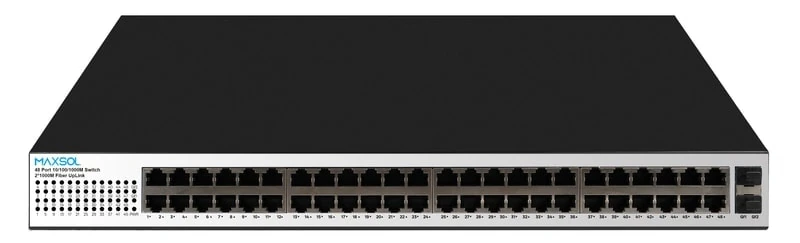
The Maxsol 48-port Gigabit PoE switch with two uplink ports and 400W budget has a documented 400W total PoE budget. Its ports 1–48 support IEEE 802.3af/at up to 30W per port.
With a 25% planning allowance, a design would target a combined connected load of up to 320W:
400W ÷ 1.25 = 320W
That does not mean every one of 48 ports can be loaded to 30W: 48 × 30W would exceed the 400W aggregate budget. This is a common PoE sizing error. The switch can support up to 30W at an individual documented port, while the total of all active ports must remain within the switch-wide budget.
Recheck the design before installation
Perform a final desk check before equipment is installed, then verify the result during commissioning. A revised camera schedule, substituted model or changed cable route can alter the power design.
Pre-installation checklist
- Confirm every camera’s maximum PoE requirement from current documentation.
- Check the required PoE standard against the exact assigned switch port.
- Confirm total simultaneous load and the selected headroom allowance.
- Check that the switch’s published total PoE budget, rather than just its power-supply rating, supports the design.
- Confirm high-power devices are assigned to appropriate ports.
- Include all non-camera PoE devices in the same budget.
- Review long cable routes, joins, patch panels and outdoor transitions.
- Record port assignments, expected load and spare capacity in handover documents.
- Confirm network uplink capacity and topology separately from PoE power capacity.
Common mistakes to avoid
Counting ports instead of watts. A 24- or 48-port PoE switch may not power that many high-demand devices simultaneously.
Using average consumption as the design value. Peak features often occur outside normal commissioning hours, particularly when lighting conditions change.
Treating every port as identical. Some switches provide higher power only on specified ports.
Equating a power supply rating with PoE budget. Use the switch’s documented PoE allocation figure.
Ignoring future changes. A spare data port is not necessarily a spare PoE port with sufficient remaining budget.
Forgetting cable and endpoint compatibility. A switch’s available wattage cannot overcome an incompatible standard, unsuitable cable run or device-side limitation.
FAQ
How much PoE power should I allow per security camera?
Use the camera manufacturer’s maximum stated PoE input requirement, not a generic allowance. Add all devices that can operate together, then apply your design headroom.
Can a 400W PoE switch supply 48 cameras at 30W each?
No. Although a port may support up to 30W, 48 ports at 30W would require 1,440W. A switch with a 400W total PoE budget must share that budget across all active PoE ports.
Is 25% headroom always necessary?
No single percentage suits every site. The key is to use a documented allowance that reflects the uncertainty, peak-load behaviour and expansion expectations of the installation. Systems with variable-load devices or likely expansion generally need more spare capacity.
What happens if a switch’s PoE budget is exceeded?
Behaviour depends on the switch’s power-management design. One or more devices may fail to power, disconnect or be denied power when they request it. Avoid reaching that point by designing and commissioning within the available budget.
Compare the linked Maxsol models against your required port count, simultaneous device load, cable distances, available power, environmental conditions and network-management requirements before selecting a switch.