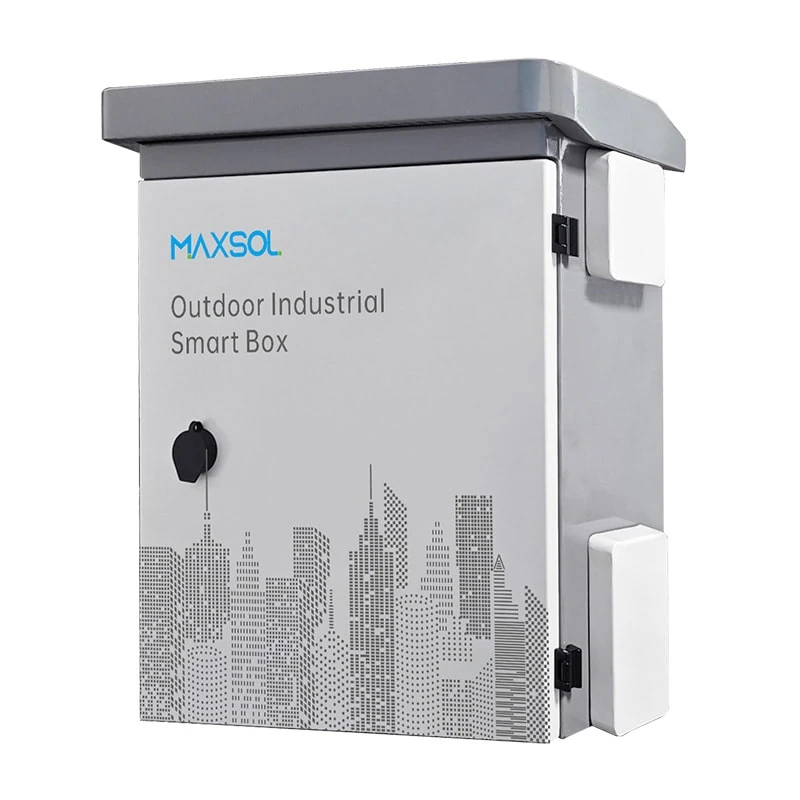
IP65 and IK10 CCTV Enclosures: How to Choose
Understand IP65 and IK10 ratings for outdoor CCTV enclosures, then compare size, materials, mounting, cable entry and maintenance needs.
By Maxsol Team

An IP65 IK10 outdoor CCTV enclosure addresses two separate risks: weather and dust ingress, and mechanical impact. IP65 indicates protection against dust and water jets; IK10 indicates a high level of impact resistance. Neither rating alone confirms that an enclosure has enough room, suitable cable entry, correct mounting hardware or safe heat management for a CCTV installation.
For UK outdoor surveillance projects, choose the enclosure around the complete installed system—not just the camera. Account for the PoE switch, power supply or battery, surge protection, cable bend radius, connectors, mounting position and future servicing. The protection rating only remains meaningful when the enclosure is installed with compatible glands, seals, fixings and unused-entry blanking plugs.
IP and IK ratings answer different questions
IP and IK ratings should be read together, not treated as alternatives.
An IP rating concerns protection against ingress: solids such as dust and liquids such as water. For an IP65 enclosure:
- 6 means the enclosure is dust-tight.
- 5 means it is protected against water jets from any direction.
An IP65 rating is useful for outdoor CCTV equipment exposed to rain, wind-blown dirt and routine cleaning. However, IP65 does not mean the enclosure is suitable for immersion, flooding, persistent submersion or every high-pressure washing arrangement. Installation details matter: a poorly fitted cable gland or an open knockout can defeat the stated ingress protection.
An IK rating concerns resistance to mechanical impact. It is separate from weather protection. IK10 is commonly specified where an enclosure may be struck accidentally or deliberately, such as at school grounds, industrial yards, access gates, car parks or low-level pole installations.
| Question | IP65 | IK10 |
|---|---|---|
| What does it assess? | Dust and water ingress | Mechanical impact resistance |
| Main outdoor CCTV concern | Rain, dust and water jets | Vandalism, knocks and accidental strikes |
| Does it confirm internal capacity? | No | No |
| Does it guarantee the installed system’s performance? | No; glands, seals and entries must be suitable | No; mounting surface and fixings also matter |
| Does it replace camera protection ratings? | No | No; assess the camera and all external equipment separately |
A common specification mistake is to request “an IP65 box” when the real site risk is impact, or to focus on IK10 while overlooking water paths at cable entries. In exposed public-facing locations, an IP65 IK10 outdoor CCTV enclosure may be a sensible starting point, but the camera, antenna, connector boots and associated power equipment must be assessed independently.
Measure the equipment and cable space
Measure every component that will sit inside the enclosure before selecting dimensions. External dimensions alone do not show how much practical installation space remains once mounting plates, cable glands, cable loops and equipment clearances are included.
Prepare a simple enclosure layout showing:
- The length, width and depth of each device.
- Cable entry positions and the direction in which connectors exit.
- Minimum bend radius for Ethernet, fibre or power cable.
- Space around vents, heat-producing equipment and power supplies.
- Locations for DIN rail, mounting plates, terminal blocks or surge protection.
- A service zone so that a faulty switch or fuse can be replaced without dismantling the entire installation.
Allow for cables, plugs and service access
RJ45 plugs, DC barrel connectors and pre-terminated fibre assemblies often need more clearance than the device itself. A compact PoE switch may fit on paper but leave insufficient depth for Ethernet plugs and a safe cable bend. Similarly, a battery installation needs consideration for terminals, fuse holders, isolation components and a practical route for replacement.
Avoid filling an enclosure edge to edge. Some free space supports neater routing, reduces strain on cable entries and makes future fault finding less disruptive. It can also reduce the likelihood that cables press against a door seal when the enclosure is closed.
Compare documented enclosure dimensions
Two steel options in the Maxsol range are documented with IP65 and IK10 ratings, alongside wall or pole mounting support:
- The IB542 IP65 IK10 outdoor smart box measures 500 × 400 × 200 mm.
- The IB552 IP65 IK10 outdoor smart box measures 550 × 450 × 280 mm.
The IB552 offers more external height, width and depth than the IB542, which may help where equipment has deep connectors, larger power components or a more complex cable arrangement. That does not automatically make it the best option: a larger enclosure may be harder to position on a narrow pole, more visually prominent and potentially contain more unused air volume to manage thermally.
Confirm the usable internal dimensions, mounting arrangement, door clearance and any required accessory space before finalising a design. These details can vary from the quoted outer dimensions.
Compare steel and ABS enclosure options
Material selection should reflect the site environment, mounting method, impact exposure, electrical arrangement and installation weight—not a general assumption that one enclosure material is always better.
| Consideration | Galvanised steel enclosure | ABS enclosure |
|---|---|---|
| Documented examples | IB542 and IB552 | IP652 |
| Impact rating in documented examples | IK10 | IK09 |
| Ingress rating in documented examples | IP65 | IP65 |
| Material details | 1.2 mm galvanised steel with powder coating | 4 mm ABS housing |
| Typical decision driver | Higher documented impact rating and metal construction | Non-metallic housing and a different enclosure format |
| Installation point to check | Earthing/bonding requirements and corrosion exposure | Suitability for site temperature, sunlight exposure and mounting load |
| Important common check | Correct glands, seals, entries and fixings | Correct glands, seals, entries and fixings |
The IB542 and IB552 are made from 1.2 mm galvanised steel with powder coating. Their documented IK10 impact resistance can be relevant in locations where equipment is within reach or exposed to harder knocks. The condition of the coating, cut edges, fixings and installation environment should still be considered, especially in persistently damp or corrosive settings.
For projects where ABS is more appropriate, the IP652 plastic distribution box is a 600 × 500 × 220 mm enclosure with a 4 mm ABS housing, IP65 protection and IK09 impact resistance. Its documented applications include junction, distribution, battery, control and monitoring uses. It should be assessed as part of the full system rather than assumed to suit every CCTV layout.
Do not equate material with a complete rating
Steel does not automatically mean an enclosure is IP65 or IK10; ABS does not automatically mean it is unsuitable outdoors. The rating is assigned to a particular enclosure design and depends on the condition of the installed assembly.
For example, drilling an unplanned hole, fitting an unsuitable cable gland or leaving an entry unsealed can change the practical protection of either a steel or ABS enclosure. Match cable accessories to the enclosure material, hole size, cable outside diameter and environmental exposure.
Plan wall or pole mounting
Mounting is part of enclosure selection because the same box can perform very differently on a rigid masonry wall, a vibrating steel pole or a lightweight fence structure.
The IB542 and IB552 support wall or pole mounting. Choose between these methods according to cable routes, access height, exposure to impact and the strength of the supporting structure.
Wall mounting considerations
Wall mounting can offer a stable surface and straightforward access for maintenance. Before installation, check:
- The substrate type and condition: masonry, concrete, steelwork, cladding or timber all require appropriate fixings.
- Whether the door can open fully without hitting a wall return, fence, conduit or camera bracket.
- Cable routes above and below the enclosure.
- Potential water run-off from roofs, ledges and gutters.
- The risk of unauthorised access at low level.
- Whether the location allows safe inspection and servicing.
Do not place an enclosure where water regularly pools around the door edge or where a damaged gutter discharges directly over cable entries. IP65 addresses defined water-jet protection, but sound siting still reduces avoidable stress on seals and glands.
Pole mounting considerations
Pole mounting can shorten cable routes to cameras, wireless bridges or lighting infrastructure. It also raises the enclosure above casual interference. However, it introduces additional checks:
- Confirm pole diameter and the compatibility of the mounting hardware.
- Check pole condition, wall thickness and structural suitability for the enclosure and fitted equipment.
- Consider wind movement and vibration, particularly on taller poles.
- Keep cable runs supported so their weight does not pull on glands.
- Position the door and hinges for safe access from the intended maintenance side.
- Avoid placing the enclosure where a vehicle, mower, gate or public activity is likely to strike it.
A pole-mounted enclosure should not rely on cable conduits or glands to carry equipment weight. Use suitable brackets and fixings, and ensure the finished mounting remains stable when the door is opened for service.
Cable entry, grounding, cooling and maintenance
An enclosure rating describes the enclosure when correctly configured; it is not a substitute for installation design. Cable entries, earthing, thermal conditions and maintenance access often determine whether an outdoor CCTV cabinet remains reliable over time.
Choose cable entries carefully
Cable entry is one of the most frequent weak points in outdoor installations. Plan entry locations before drilling or ordering a pre-configured arrangement.
Good practice includes:
- Using glands sized for the actual cable outside diameter.
- Selecting glands and sealing accessories appropriate to the intended ingress protection.
- Fitting blanking plugs to every unused entry.
- Routing cables to avoid tension, sharp edges and excessive bending.
- Providing drip loops where appropriate so water does not track along a cable towards an entry.
- Separating mains, low-voltage DC, data and fibre routes where the system design requires it.
- Protecting exposed external cable from abrasion, UV exposure or mechanical damage with suitable containment.
If an enclosure needs multiple camera cables, uplinks, antenna feeders and power conductors, map each entry before cutting. Repositioning holes later may be inconvenient and can compromise the intended sealing arrangement.
Assess grounding and electrical protection
Where a metal enclosure forms part of an electrical installation, assess protective bonding and earthing requirements as part of the overall design. The correct approach depends on the supply arrangement, equipment class, cable types, site earthing system and applicable installation requirements.
Outdoor camera systems may also need consideration of surge and lightning-related risks, particularly where cables run between buildings, across open areas or up poles. The enclosure itself is not a complete surge-protection strategy. Specify appropriate protective devices, bonding arrangements and cable routing for the installation.
Electrical work should be designed, installed and verified by competent persons in line with the relevant UK requirements and the equipment manufacturers’ instructions.
Manage heat without undermining ingress protection
PoE switches, power supplies, battery charging equipment and network devices all produce heat. A sealed IP65 enclosure does not automatically provide enough cooling for every internal load, particularly in direct sunlight or where several active devices are packed closely together.
Before specifying the enclosure, consider:
- Total equipment power consumption and heat output.
- Maximum expected ambient temperature at the mounting location.
- Solar gain on south- or west-facing surfaces.
- Heat from batteries, chargers and power conversion equipment.
- The effect of cable congestion on air circulation.
- Whether the equipment manufacturer specifies clearance or temperature limits.
- Whether any cooling, shading or thermal management method would affect ingress protection.
Do not add unprotected vents merely to solve a heat issue. Open vents can reduce practical resistance to dust and water. If thermal management is required, select a solution designed for the intended environmental protection level and verify the combined assembly.
Make maintenance possible
CCTV systems are easier to maintain when the enclosure layout is planned for inspection. Leave room to read labels, test connections, replace a power supply and access fuses or terminals without removing unrelated equipment.
A practical maintenance plan should include periodic checks for:
- Damaged door seals, glands and blanking plugs.
- Loose mounting fixings or brackets.
- Water marks, condensation or dirt accumulation inside the enclosure.
- Cable strain and abrasion at entries.
- Corrosion or coating damage on metal surfaces.
- Signs of overheating, including discolouration or unusually hot equipment.
- Door closure and lock condition, where fitted.
Always isolate equipment safely before carrying out internal work.
Selection checklist
Use this checklist when specifying an IP65 IK10 outdoor CCTV enclosure:
- Is IP65 sufficient for the expected dust, rain and water-jet exposure, without assuming immersion protection?
- Does the location call for IK10 impact resistance, or is a lower documented impact rating acceptable?
- Have you measured all devices, connectors, cable loops and bend radii?
- Is there enough usable space for installation and future replacement work?
- Have you selected steel or ABS based on the actual environment, impact risk and electrical design?
- Is the mounting surface or pole structurally suitable for the loaded enclosure?
- Can the door open fully and be serviced safely after installation?
- Are cable glands, blanking plugs and conduit entries compatible with the intended ingress protection?
- Have grounding, bonding and surge protection been assessed for the complete installation?
- Will internal equipment remain within its permitted operating conditions?
- Have direct sun, water run-off, vibration and accidental impact been considered?
- Is there a clear labelling, isolation and maintenance plan?
Common specification mistakes to avoid
The most common error is treating a rating as a complete design answer. An IP65 IK10 enclosure may be appropriate for the outer shell, yet still be a poor final choice if it lacks space for deep Ethernet connectors, cannot be fixed safely to the intended pole, or will run too warm with the planned equipment.
Also avoid assuming that a drilled enclosure retains its original protection rating. Every added entry needs a compatible gland or sealing method, and every unused opening needs secure blanking. Finally, do not assess the enclosure in isolation: cameras, external power supplies, wireless equipment and cable joints need their own environmental and mechanical protection review.
FAQ
Is IP65 good enough for an outdoor CCTV enclosure?
IP65 is commonly appropriate where an enclosure needs protection from dust and water jets, including normal rain exposure. It is not an immersion rating, so assess flood risk, standing water and any unusually forceful washing separately. The installed cable glands and seals must also be suitable.
Is IK10 better than IP65?
Neither is “better” because they measure different things. IP65 relates to dust and water ingress; IK10 relates to impact resistance. Outdoor CCTV installations often need both weather protection and suitable resistance to knocks or vandalism.
Does an IK10 enclosure protect the CCTV camera itself?
Not necessarily. The enclosure may protect equipment inside it, such as a switch, power supply or connections. The camera housing, lens, connectors and mounting bracket must be specified separately for their own environmental and impact exposure.
Should an outdoor CCTV enclosure be larger than the equipment?
Yes. Leave room for connectors, cable bend radius, mounting hardware, electrical protection, air circulation and maintenance access. Select using a layout of the installed components rather than device dimensions alone.
Compare the linked Maxsol enclosure models against your required port count, electrical load, cable distance, power arrangement, environmental exposure and management requirements before selecting a final enclosure.