300m Long-Range PoE for IP Cameras: Planning Guide
Learn how a 300m long-range PoE switch can extend selected IP camera links, with cable, power, port and commissioning checks.
By Maxsol Team

A long-range PoE switch can make selected IP camera runs of up to 300 metres practical where a conventional copper Ethernet connection would normally be limited to a 100-metre channel. It does this by using a dedicated extend mode, rather than making every Ethernet port or every cable installation capable of 300m operation.
For a dependable result, treat 300m as a design target to validate—not an automatic entitlement. Confirm which ports support extend mode, the reduced link rate in that mode, cable condition and conductor type, the camera’s real power draw, and exposure to weather, surge risk and voltage drop. A long-range link that powers a camera but cannot carry its intended video stream is not a successful installation.
Why standard Ethernet distance matters
Standard copper Ethernet channel design is based on a maximum distance of 100 metres. This normally includes horizontal permanent cable, patch leads and connection points. Within that limit, correctly specified and installed cabling gives a predictable basis for data and Power over Ethernet (PoE) planning.
Security projects do not always fit that layout. Cameras may sit at a gate, perimeter fence, yard entrance, farm building, car park or detached outbuilding that is well beyond the nearest communications cabinet. Installing a local mains supply and a network cabinet at the camera end can add cost, civil works and maintenance responsibilities.
A 300m long-range PoE switch is intended to bridge some of that gap on a single copper run. The important qualification is that long-range operation is generally a trade-off:
- Distance increases, but available data rate may be lower than normal Fast Ethernet operation.
- PoE can still be delivered, but cable resistance and the device’s power demand become more important.
- The link may be suitable for one camera, but not necessarily for a high-bitrate multi-sensor camera or a downstream switch.
- Cable quality matters more, particularly on existing unknown cable or outdoor runs.
For IP cameras, lower bandwidth is often entirely workable when camera settings are appropriate. A modest-resolution camera using sensible frame rates and compression may need only a fraction of the bandwidth available. However, do not size a long-range run from assumptions. Calculate from the camera’s intended main stream, sub-stream, audio where used, analytic features and any periods of higher bitrate, such as night scenes with movement.
What a 100m limit does not mean
The 100m Ethernet rule is not a cliff where every connection stops working at 101m. Some links may appear to operate beyond it, especially on good cable and at lower speeds. That is not the same as a designed, supportable installation.
Relying on an overlength conventional link can lead to intermittent video, auto-negotiation problems, packet loss or unstable PoE—often after seasonal temperature changes, moisture ingress or a camera changes mode at night. Extend mode gives the installer a deliberate long-distance operating option, but it must still be commissioned at the actual site.
What 300m Extend mode changes
In extend mode, the switch changes the operating conditions for supported PoE connections so that a longer copper run can be used. Depending on the switch design, the extended link operates at a lower Ethernet rate than its normal mode. This is the central compromise: distance is prioritised over throughput.
Do not assume that 300m mode provides standard 100 Mbps performance, Gigabit speed, or 300m support on every port. Check the particular switch documentation before finalising the design, including:
- Which downlink ports can use long-range mode.
- Whether the setting applies per port, per group or to a wider operating mode.
- The data rate negotiated or specified in extend mode.
- Whether the quoted 300m distance applies to the cable type and powered-device conditions in your design.
- Any constraints where high-power PoE and long-range mode are used together.
For a single conventional IP camera, long-range mode can avoid adding a mid-span repeater, remote switch or local AC supply. It is usually less appropriate for a remote cluster of cameras behind another switch, a wireless bridge carrying many users, or a camera requiring sustained high bitrates.
Plan bandwidth from the camera backwards
Start with the recording and viewing requirement, not the distance.
Ask the camera supplier or configuration team for:
- Main-stream bitrate at the chosen resolution, frame rate and compression.
- Maximum bitrate, rather than only a typical daytime figure.
- Secondary stream requirements for remote viewing.
- Audio, metadata and analytics traffic where applicable.
- Whether the camera supports a 10 Mbps Ethernet link, if that is the applicable long-range mode.
- The number of cameras sharing each uplink and the aggregate traffic during busy periods.
A camera’s configured bitrate should leave reasonable headroom below the long-range link capacity. Avoid relying on a link that works only when video is quiet. Scenes with rain, foliage, vehicle movement, low light and infrared illumination can materially increase bitrate demand.
Long-range mode is not a cure for poor infrastructure
Extend mode does not repair damaged cable, poor termination, wet junction boxes or a badly planned outdoor route. Common causes of difficulty include:
- Copper-clad aluminium (CCA) cable instead of solid copper cable.
- Excessive joins, poorly made plugs or unprotected couplers.
- Water ingress in an external enclosure.
- Kinked, crushed or stretched cable.
- Runs placed alongside sources of electrical interference without suitable route planning.
- No surge protection approach for exposed building-to-building or perimeter cabling.
A clean, correctly terminated solid-copper cable route remains the best starting point.
Cable and powered-device checks
Cable must carry both data and DC power. At 300m, conductor resistance has a larger effect than it does on a short office patch lead. As cable length and resistance rise, more voltage is lost along the route and more energy is dissipated in the cable. A camera may initially boot, then become unstable when its heater, infrared LEDs, pan-tilt mechanism or other load becomes active.
Choose and inspect the cable carefully
For long outdoor camera routes, document the cable route and check the following before handover:
| Check | Why it matters at long range |
|---|---|
| Solid-copper conductors | Lower resistance than CCA helps both PoE delivery and link reliability. |
| Suitable cable category and construction | Supports the intended Ethernet link and installation environment. |
| Continuous route quality | Every join, coupler and patch lead introduces another potential fault point. |
| Termination quality | Split pairs, poor contacts and inconsistent terminations can cause errors or failed negotiation. |
| Outdoor and UV suitability where exposed | Reduces deterioration of cable exposed to weather. |
| Physical protection | Protects against impact, rodents, movement and accidental damage. |
| Separation from power circuits | Helps reduce interference and supports safer route planning. |
Do not judge cable only by the printing on its jacket. Test the installed run where possible, and investigate marginal results before the camera is mounted in an inaccessible position.
Check the camera’s real peak load
The figure in a camera datasheet may be a maximum, typical value or a value conditional on specific features. Establish the highest credible operating demand for the installed configuration. Pay particular attention to:
- Infrared illumination switching on at dusk.
- Built-in heaters and blowers in cold conditions.
- PTZ movement, especially simultaneous pan, tilt and zoom.
- Motorised lenses.
- White-light illumination.
- Additional accessories powered from the camera or its housing.
The switch’s port limit, its total PoE budget and the power reaching the remote device are three different checks. A port capable of supplying a high maximum power does not mean that maximum is available to all ports simultaneously, nor that a distant cable run can deliver it without adequate voltage at the camera.
Consider the environment as part of the network design
Outdoor camera locations need more than a long enough cable. Assess the switch cabinet, earthing arrangement, cable entry points, condensation risk and the need for appropriate power and surge protection. Routes between structures or across open ground can have greater electrical exposure than an internal office installation.
Use equipment and installation methods appropriate to the environment, and follow the requirements of the project’s electrical and site-safety design. Long-range PoE reduces the need for remote powering in some cases; it does not remove the need for a considered outdoor protection strategy.
Compare 4, 8, 16 and 24-port options
Port count should reflect the number of cameras, anticipated expansion, uplink design and PoE budget—not simply the number of cameras currently on the drawing. A spare port is useful, but a larger switch is only beneficial when its uplinks, location, power budget and cabinet space also suit the project.
The models below have Fast Ethernet PoE downlink ports. Their uplinks differ, which matters when traffic from many cameras converges on the recording network.
| Model | PoE downlink ports | Uplink arrangement | PoE budget | High-power PoE allocation |
|---|---|---|---|---|
| PS1402E | 4 Fast Ethernet | 2 Fast Ethernet uplinks | 65W | Up to 60W on port 4 |
| PS1802GE | 8 Fast Ethernet | 2 Gigabit uplinks | 120W | Up to 60W on ports 7–8 |
| PS11602FE | 16 Fast Ethernet | 2 Gigabit plus 1 SFP uplink | 200W | Up to 60W on ports 13–16 |
| PS12402FE | 24 Fast Ethernet | 2 Gigabit plus 1 SFP uplink | 300W | Up to 60W on ports 20–24 |
Four-port option for a small camera group
For a compact installation, the PS1402E 4-port long-range PoE switch provides four Fast Ethernet PoE ports, two Fast Ethernet uplinks, a 65W PoE budget and 300m long-range mode. It also includes VLAN and watchdog functions, with up to 60W available on port 4.
The key design constraint is aggregation: its uplinks are Fast Ethernet, so calculate the combined traffic from all attached cameras rather than considering each camera independently. The 65W budget also needs to cover the actual connected load, with headroom for peak operation.
Eight ports where Gigabit uplinks are needed
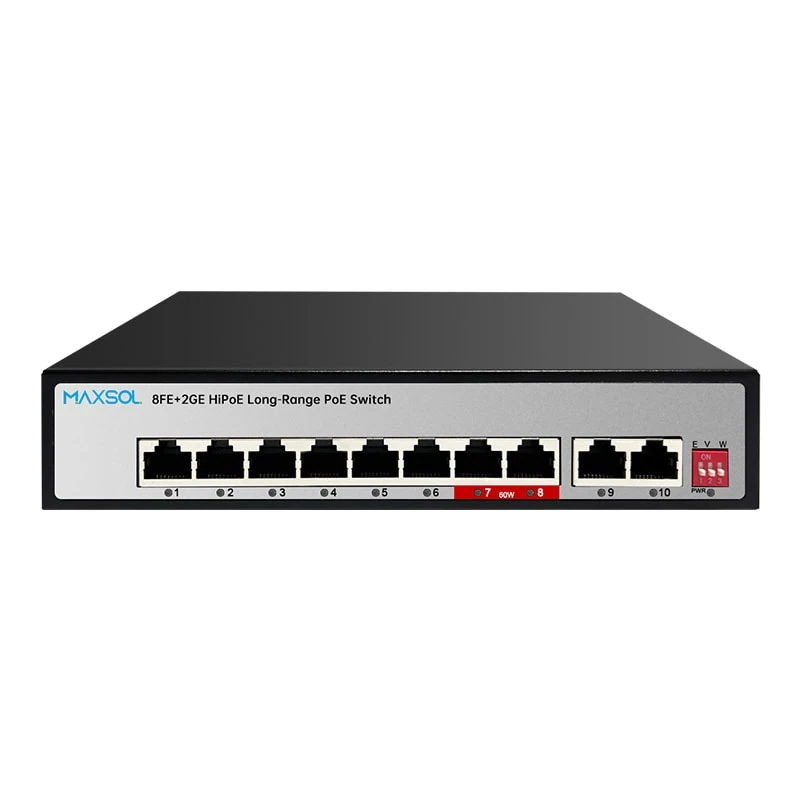
The PS1802GE 8-port long-range PoE switch has eight Fast Ethernet PoE ports, two Gigabit uplinks, a 120W PoE budget and up to 60W on ports 7–8.
Gigabit uplinks can be a more suitable aggregation path where several cameras feed into an NVR, core switch or wider security network. They do not change the fact that each PoE camera downlink is Fast Ethernet, and they do not guarantee that an extended downlink retains standard Fast Ethernet speed.
Sixteen ports for growing edge cabinets
The PS11602FE 16-port long-range PoE switch provides 16 Fast Ethernet PoE ports, two Gigabit uplinks and one SFP uplink, with a 200W budget. Up to 60W is available on ports 13–16.
This layout may suit a perimeter cabinet or a larger local camera zone where fibre is part of the uplink plan. Confirm the SFP type, optical design and compatibility requirements separately; an SFP uplink is an interface provision, not a complete fibre link design.
Twenty-four ports for higher camera counts
The PS12402FE 24-port long-range PoE switch offers 24 Fast Ethernet PoE ports, two Gigabit uplinks and one SFP uplink, with a 300W PoE budget. Its ports 20–24 can each provide up to 60W.
At this scale, power and uplink planning become especially important. A 24-port switch does not require all ports to be occupied, but it should be selected with realistic allowance for simultaneous camera peaks, cabinet heat, network aggregation and future changes.
Hi-PoE port allocation and power budgets
High-power PoE capability should be assigned intentionally. On these models, only specified port ranges have an up-to-60W capability:
- PS1402E: port 4.
- PS1802GE: ports 7–8.
- PS11602FE: ports 13–16.
- PS12402FE: ports 20–24.
Reserve those ports for devices that genuinely require higher power, such as a suitable PTZ camera or powered housing. Standard fixed cameras should normally be placed on ordinary PoE ports where their needs are lower, preserving high-power capacity for where it is required.
Budget from maximum simultaneous demand
A practical PoE budget calculation uses the expected maximum demand of every powered device that can operate at once:
- List every camera and powered accessory.
- Record its maximum input power for the intended configuration.
- Identify loads that activate together, including infrared, heaters and PTZ movement.
- Total the simultaneous demand.
- Compare the result with the switch’s stated overall PoE budget.
- Leave design headroom rather than planning to run continuously at the limit.
For example, the PS1802GE has a 120W total budget, but the presence of two ports capable of up to 60W does not mean two 60W devices can operate alongside any additional PoE load. Their combined allocation could consume the whole stated budget. Cable losses over a long route and device start-up behaviour are further reasons to avoid a zero-headroom design.
Also verify the powered device’s PoE requirements and negotiation compatibility. “Up to 60W” is a maximum port capability, not a universal promise that every high-power device will be supported in every operating condition.
Commissioning checklist
Commission the long-range link under realistic conditions before the installer leaves site. A camera picture on a laptop at midday is not a sufficient final test for a 300m outdoor run.
- Confirm the cable route length and record it accurately.
- Verify that the installed cable is appropriate for PoE and not CCA where solid copper is required by the design.
- Inspect and test terminations, joints, glands and weatherproof enclosures.
- Confirm that the chosen switch port supports the required long-range mode.
- Enable or configure extend mode according to the relevant product documentation.
- Check the negotiated link state and the actual operating data rate.
- Configure the camera’s stream bitrate within the measured and specified link capacity.
- Test live video, recording, playback and remote viewing at the same time.
- Observe packet loss, frame drops, reconnections and latency over a meaningful period.
- Test day-to-night transition, infrared illumination, heaters and PTZ movement where fitted.
- Measure or verify PoE stability at the camera under peak load.
- Check aggregate uplink traffic from all cameras, not only the long-range port.
- Verify the cabinet’s environmental protection, earthing and surge-protection approach.
- Label the switch port, camera location, cable route, mode setting and planned power load for future maintenance.
Common mistakes to avoid
The most frequent specification error is treating “300m” as the only requirement. Distance is just one part of the link. Avoid these shortcuts:
- Selecting a switch before knowing the camera’s peak wattage.
- Using high-power ports for ordinary low-power cameras while leaving none for PTZ units.
- Assuming a long-range port has the same bandwidth as its normal operating mode.
- Ignoring aggregate traffic on the uplink to the NVR or core network.
- Extending a route with inexpensive couplers and patch leads rather than correcting the cable path.
- Testing only in daylight, before infrared or heating loads are active.
- Treating outdoor cable protection and surge planning as separate from network reliability.
A suitable long-range PoE design starts with the camera’s traffic and power profile, then checks cable quality and environment, then selects the switch port count and uplinks. Compare the linked Maxsol models against your required camera count, peak PoE load, longest route, uplink capacity, environmental conditions and any management requirements before specifying the final switch.