Managed vs Unmanaged PoE Switches: A Practical Guide
Compare managed and unmanaged PoE switches for cameras, access points and outdoor sites, including VLANs, diagnostics, redundancy and selection checks.
By Maxsol Team

A managed PoE switch is the better choice when you need to separate network traffic, observe faults remotely, control ports or build resilience into a critical network. An unmanaged PoE switch is often the more sensible option for a small, self-contained installation where straightforward connectivity and Power over Ethernet are the priority.
The right managed vs unmanaged PoE switch decision is therefore not about choosing the most advanced hardware. It is about matching the switch to the number of devices, the consequences of downtime, the need for network segmentation and the time available to configure and maintain it.
What unmanaged switches provide
An unmanaged PoE switch forwards network traffic automatically and supplies power to compatible devices over Ethernet cabling. In practice, it is designed for a simple installation: connect the uplink, connect IP cameras, wireless access points or other PoE devices, check the power budget and verify that the devices come online.
For small networks, that simplicity has worthwhile benefits:
- Faster installation: there is usually no web interface, command line or switch configuration to complete.
- Lower administrative overhead: an installer does not have to create VLANs, user accounts, monitoring rules or configuration backups.
- Fewer settings to get wrong: a basic camera spur or temporary site network may not justify a detailed configuration.
- Straightforward replacement: replacing a failed unit can be easier where no device-specific configuration needs restoring.
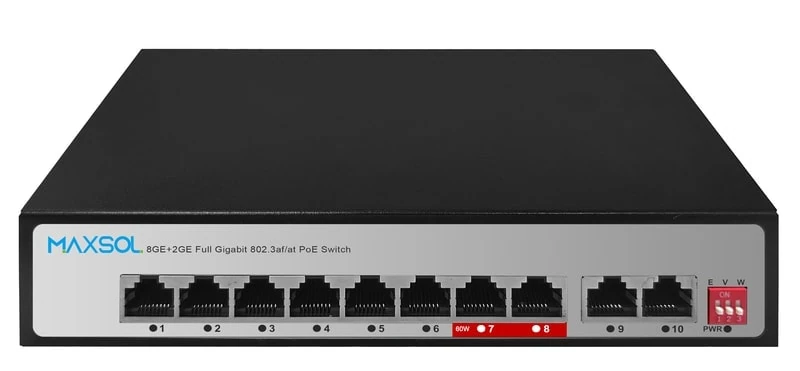
Unmanaged does not mean featureless. Some models provide hardware-selected operating modes. For example, the PS1802G unmanaged 8-port Gigabit PoE switch has DIP-selectable Extend, VLAN isolation and AI watchdog modes. These can be practical for particular installations, but they are not a substitute for the flexible, software-configured VLANs and diagnostics of a managed switch.
The limits of plug-and-play networking
The trade-off for simplicity is reduced visibility and control. If a camera stops responding on an unmanaged switch, engineers generally need to investigate at the site. They cannot normally inspect per-port traffic, alter a port setting remotely or determine from a management interface whether a particular connection is congested.
An unmanaged switch is also usually unsuitable where several systems share one physical network but must remain logically separated. A reception Wi-Fi service, building-management equipment and CCTV may all be connected, yet they have different security, traffic and support needs.
Before choosing unmanaged equipment, ask a basic question: if one device or cable fails, can someone reasonably attend the site and troubleshoot it? If yes, simple switching may be entirely appropriate.
What management adds
A managed PoE switch gives an authorised administrator a configuration and visibility layer over the physical ports. The exact controls vary between models, so the product documentation should always be checked, but common managed functions include VLAN configuration, port status and statistics, quality-of-service policies, multicast handling and remote administration.
Management is particularly valuable where a fault must be narrowed down without visiting the installation. Instead of seeing only that a camera is offline, an engineer may be able to assess whether the port has a network link, whether traffic is passing, whether the device has been placed in the intended VLAN or whether the uplink is the likely point of failure.
The operational gains usually fall into five areas.
| Requirement | Unmanaged PoE switch | Managed PoE switch |
|---|---|---|
| Initial deployment | Connect devices and test | Configure ports, access and policies before handover |
| Network separation | May offer fixed isolation modes | Configurable VLAN design across ports and uplinks |
| Fault investigation | Primarily on-site checking | Port-level status and network-management visibility |
| Traffic control | Automatic forwarding only | Features such as QoS and multicast controls may be available |
| Resilience design | Limited switch-level control | Can support managed uplinks and, on suitable models, redundancy features |
| Ongoing effort | Very low | Requires documentation, access control and configuration maintenance |
Management does create responsibilities. Someone must document the network plan, securely retain administrator access, save configurations and keep changes controlled. A managed switch configured without a clear design can be less reliable operationally than an unmanaged switch deployed carefully.
Features that should solve a real requirement
Do not select a managed switch solely because it has a longer feature list. Start with the problem to be solved:
- VLANs are useful when device groups must be separated while sharing switching infrastructure.
- QoS can help prioritise important traffic where links may be busy, but it needs an agreed policy rather than a default setting.
- IGMP Snooping is relevant for networks using multicast traffic; it is not automatically necessary for every camera system.
- LLDP can assist with device and topology visibility where compatible equipment is used.
- SNMP can support central monitoring, provided the monitoring platform and security approach are planned.
- Static routing is relevant only where the switch’s routing role is intended and the wider IP addressing design supports it.
For example, the PS2802SFG-I-BT managed DIN-rail industrial PoE switch provides Web and SNMP management, alongside VLAN, QoS, LLDP, IGMP Snooping, ERPS and static routing features. Those capabilities may suit an installation that needs defined traffic paths and remote operational insight, but they still need correct design and commissioning.
VLAN monitoring and redundancy questions
VLANs, monitoring and redundancy are often the dividing line between an unmanaged and managed PoE switch. Each should be specified from the whole network outward, rather than as an isolated switch feature.
VLAN design: isolation is not the same as a VLAN architecture
A VLAN groups ports and traffic logically, allowing separate networks to share switching links while remaining segmented according to the configured rules. A typical design might place surveillance devices, staff network devices and guest wireless users in different VLANs. Their routes to recorders, internet gateways or management systems can then be controlled at the appropriate network layer.
This requires more than turning on VLANs at one switch. Confirm:
- Which devices belong in each VLAN.
- Whether uplinks carry one VLAN or multiple tagged VLANs.
- Where routing between VLANs is permitted, if at all.
- Whether camera recorders, management workstations and cloud services can reach the devices they need.
- How replacement ports will be assigned and documented.
A DIP-selected VLAN isolation mode can limit communication patterns on a local switch, which may be useful in a straightforward camera installation. It does not provide the same adaptable, end-to-end segmentation as a managed VLAN design across switches, routers and wireless infrastructure.
A common mistake is to configure a camera VLAN but overlook the recorder, remote viewing gateway or engineer’s management workstation. The result is an apparently secure design that prevents legitimate access. Draw the traffic paths before assigning ports.
Monitoring: define the fault questions first
Monitoring is useful only if it answers practical questions during an incident. For a distributed surveillance or wireless deployment, useful questions may include:
- Is the switch reachable on the management network?
- Is the uplink connected and passing traffic?
- Which port has lost its Ethernet link?
- Has the issue affected one device, one cable run or an entire remote cabinet?
- Is multicast traffic behaving as intended?
- Can the support team distinguish a network issue from a camera, access point or power issue?
A managed switch can contribute valuable data, but monitoring is a system design task. Confirm protocol support, management VLAN arrangements, alert handling and who will act on an alarm. Do not assume that buying a manageable switch alone creates a monitored network.
Redundancy: protect the failure point that matters
Redundancy is not simply “two cables are better than one”. It requires a deliberate topology, suitable compatible equipment and a clear understanding of what failures are covered.
In a ring or alternative-path design, a redundancy protocol can help preserve connectivity after a link failure. However, it will not fix a failed end device, damaged cable routes sharing the same trench, loss of upstream internet service or a site-wide power interruption. It may also add complexity that a small standalone network does not need.
Where ring resilience is a genuine project requirement, confirm all participating switches support the selected approach and that the topology is configured and tested during commissioning. The PS2802SFG-I-BT lists ERPS among its features; that is relevant to a properly designed ERPS deployment, not a reason to assume every network needs a ring.
For outdoor and remote locations, the power design is equally important. Consider the switch power source, device load, backup expectations, cable paths and protection requirements together. Network redundancy without an appropriate power plan may not deliver meaningful uptime.
When a simple camera network can remain unmanaged
A simple camera network can remain unmanaged when its scope, risks and support model are genuinely simple. This is common where a small group of cameras connects to one recorder or upstream network point, all devices are under the same operational control and an on-site visit is acceptable if a fault occurs.
An unmanaged PoE switch is usually a defensible choice when all of the following are true:
- The number of connected devices is modest and unlikely to expand substantially.
- Cameras do not need to be separated from other network services through configurable VLANs.
- There is no requirement for central switch monitoring or remote port diagnosis.
- The uplink topology is simple, without a resilient ring or managed aggregation design.
- Device traffic is predictable, and there is no identified need for QoS or multicast management.
- An installer can physically check cabling, power and device status when necessary.
- The PoE power requirement has been calculated with sensible allowance for startup and operating conditions.
Even in this scenario, commissioning still matters. Verify that each PoE device starts reliably, that the total load remains within the available PoE budget, and that the Ethernet cabling is suitable for the link requirement. Label ports and cable runs so that a later service visit does not become a tracing exercise.
Situations where unmanaged is a false economy
The convenience of an unmanaged switch can become costly when the site is remote, difficult to access or expected to grow. Consider managed switching instead if:
- several tenants, departments or systems will share the same infrastructure;
- repeated fault visits are already consuming engineer time;
- a wireless bridge, camera estate or field cabinet needs central visibility;
- ports need different policies rather than one common behaviour;
- the network needs controlled multicast, QoS or a resilient uplink design; or
- the specification requires a documented management and monitoring approach.
The key point is proportionality. A managed switch is not automatically superior for every eight-camera installation. It is superior when the operational control it provides is worth the added design and administration.
Compare approved Maxsol examples
The following examples show how the managed versus unmanaged distinction affects selection. They should be compared against the project design and the current product documentation, rather than treated as interchangeable options.
| Example | Management approach | Relevant stated context | Best evaluated for |
|---|---|---|---|
| PS1802G | Unmanaged | 8-port Gigabit PoE switching with DIP-selectable Extend, VLAN isolation and AI watchdog modes | Straightforward PoE device networks where local simplicity is the priority |
| PS2802SFG-I-BT | Managed | 8GE plus 2 SFP managed DIN-rail industrial PoE switching; Web and SNMP management, VLAN, QoS, LLDP, IGMP Snooping, ERPS and static routing | Industrial installations requiring configuration, monitoring and designed network controls |
| SBOX2802SFG-I | Managed | 8 Gigabit PoE ports, 2 Gigabit SFP slots, Layer 2 management, IP65 protection and a built-in 240W UPS power module | Outdoor or enclosed-site designs where switching, protection and power planning must be assessed together |
The SBOX2802SFG-I managed industrial smart Ethernet box is relevant where the installation environment is part of the decision. Its Layer 2 management, IP65 protection and built-in 240W UPS power module should be assessed as part of the complete enclosure, device-load and site-power design. Confirm whether the planned PoE load, backup requirement, cable entries and physical installation arrangements fit the project.
For all three examples, verify the current requirements for port count, uplink type, PoE demand, power input, environmental conditions, mounting, cable distances and compatible connected devices. These are project-specific checks, not choices that can be made from management capability alone.
Decision checklist
Use this checklist before specifying a managed or unmanaged PoE switch:
- Count today’s ports and planned growth. Include cameras, access points, bridges and any spare capacity required by the project.
- Calculate PoE demand. Add the requirements of every powered device and check the switch’s stated power capability, including the intended operating conditions.
- Map the traffic. Identify where cameras, recorders, wireless clients, management systems and internet gateways must communicate.
- Decide whether segmentation is required. If different systems need separate VLANs, define the VLAN and uplink plan before selecting hardware.
- Assess the cost of a site visit. Remote or difficult-access sites often justify managed diagnostics even where the network is small.
- Review the uplink and distance design. Check copper and fibre needs, cable routes, link speeds and any requirement for alternative paths.
- Define the resilience target. Decide which failures matter and whether power backup, dual paths or ring design would genuinely address them.
- Consider the environment. Indoor cabinet, DIN rail, outdoor enclosure, temperature exposure, ingress protection and power arrangement can be decisive.
- Plan management responsibly. For managed hardware, define administrator access, configuration backups, monitoring ownership and change records.
- Test the complete system. Commission powered devices, network access, recorder connectivity, alarms and any resilience behaviour as an end-to-end installation.
Choose unmanaged PoE switching when it keeps a well-bounded network simple. Choose managed PoE switching when segmentation, visibility, traffic controls or resilience will solve a defined operational problem. To take the next step, compare the linked Maxsol models against your required port count, PoE load, cable distance, uplink design, installation environment and management requirements.