90W PoE++ 802.3bt Switch Guide for UK Projects
Learn when a 90W PoE++ 802.3bt switch is needed, how to check cables and power budgets, and compare practical industrial options.
By Maxsol Team

A 90W PoE++ 802.3bt switch is needed when a powered device requires more power than standard PoE+ can safely provide, or when one Ethernet cable must supply both data and substantial power to equipment such as a high-specification PTZ camera, an outdoor wireless unit with integrated heating, or a multi-function edge device.
The important qualification is that “90W per port” normally describes power available at the switch port, not necessarily power delivered at the device. Cable resistance, cable length and connections reduce the power arriving at the far end. Select the switch around the device’s actual input requirement, then verify the port type, four-pair cabling and the switch’s total PoE budget.
PoE classes in practical terms
PoE uses Ethernet cabling to carry low-voltage DC power alongside network data. It can simplify an installation by reducing the number of local mains supplies, but every PoE design has two sides:
- PSE (Power Sourcing Equipment): the switch or injector delivering power.
- PD (Powered Device): the camera, access point, bridge, intercom or other endpoint receiving it.
The labels PoE, PoE+ and PoE++ are useful shorthand, but they should not replace a power calculation. The device data sheet should state its maximum power requirement, the relevant standard where applicable, and any higher demand caused by heaters, infrared illumination, motor movement or battery charging.
| PoE category | Common IEEE reference | Typical maximum power from the switch | Practical use |
|---|---|---|---|
| PoE | IEEE 802.3af | Up to 15.4W per PSE port | Basic IP cameras, VoIP handsets, simple sensors |
| PoE+ | IEEE 802.3at | Up to 30W per PSE port | Many fixed cameras, standard access points, door stations |
| PoE++ Type 3 | IEEE 802.3bt | Up to 60W per PSE port | Higher-demand access points, larger cameras and some multi-function devices |
| PoE++ Type 4 | IEEE 802.3bt | Up to 90W per PSE port | Devices with substantial peak demand or 90W-class input requirements |
Power available at the PD is lower than the power supplied by the PSE. A 90W PSE port is commonly associated with up to around 71W available to a compliant PD under the relevant IEEE assumptions. This difference matters: specifying a 90W PoE++ 802.3bt switch solely because the endpoint is labelled “70W” leaves little room for cable loss, temperature effects or start-up demand.
Also distinguish between:
- Normal operating consumption, such as a camera’s steady daytime load.
- Maximum or peak consumption, such as a PTZ motor moving while infrared LEDs and a heater are active.
- Inrush or start-up demand, which may briefly occur when an endpoint powers on.
- Specified PoE class, which determines how a standards-based device and PSE negotiate power.
For a robust design, use the highest credible device demand, not an optimistic typical figure.
When higher-power devices need 802.3bt
Use 802.3bt when the endpoint’s maximum requirement exceeds what 802.3at PoE+ can deliver at the device, or where the installation needs margin beyond a 30W PSE port.
Typical candidates include:
- PTZ surveillance cameras with illuminators, wipers, heaters or high-powered motors;
- multi-sensor cameras with several imaging modules;
- outdoor wireless access points or CPE equipment with high radio load and environmental accessories;
- access-control equipment combining an intercom, camera and lock-control functions;
- compact edge appliances where the manufacturer specifically requires 802.3bt;
- equipment designed for 60W or 90W PoE++ operation.
Do not choose a 90W port simply because the endpoint has a large power adaptor. Check whether the product can actually accept PoE, which standard it supports and whether its quoted wattage includes an optional accessory. A device supplied with a 90W mains adaptor may consume far less in normal use, or it may not accept PoE at all.
90W is not required for every demanding endpoint
A switch with 802.3at PoE+ may remain the right choice where each device is below the usable PD power limit and the cable route is in good condition. It is often better to deploy more suitable 30W ports than to pay for high-power ports that will not be used.
Conversely, avoid placing a 60W- or 90W-class device on a conventional PoE+ port and assuming it will operate in a reduced mode. Some PDs may fall back to limited functionality; others may not start. The manufacturer’s documentation, rather than the connector shape, determines compatibility.
Plan for the maximum combined load
A switch can have two separate constraints:
- Maximum power per port — for example, whether a particular port can negotiate and supply 90W.
- Total PoE power budget — the combined power the switch can allocate to all powered ports.
Eight devices each labelled 25W create a theoretical 200W endpoint requirement before allowing for design margin. Even if every individual port supports 30W, the switch’s total budget and its input power arrangement must support the intended simultaneous load.
A sensible initial calculation is:
Total required PSE power = sum of maximum PD loads adjusted for cable loss + design margin
The exact loss allowance depends on the cable and route. For critical sites, avoid treating a simple percentage as a substitute for checking the cable channel, endpoint specification and power-source data.
Verify ports, pins, cable and input supply
A 90W PoE++ deployment only works as well as its least suitable component. Confirm the whole power path before installation: source, switch input, individual port, horizontal cable, patch leads, connectors and powered device.
Check which physical ports provide 90W
A common specification mistake is assuming every RJ45 port on a PoE switch offers the same power level. Many industrial switches provide high-power capability only on selected ports, with remaining ports supporting PoE or PoE+.
Create a port schedule before fitting equipment. Record:
- device name and location;
- maximum power demand;
- required PoE standard or voltage range;
- assigned switch and port number;
- cable length and category;
- any injector, surge protection or intermediate connection;
- maximum combined load for that switch.
Assign 90W endpoints to the explicitly documented high-power ports. Do not rely on a port’s location, colour or “PoE” label alone.
Confirm four-pair continuity and pin compatibility
IEEE 802.3bt uses all four twisted pairs to deliver higher power. That makes cabling verification especially important.
For a 90W PoE++ 802.3bt switch installation, check that:
- the route uses a complete four-pair Ethernet cable;
- all eight conductors are terminated correctly end to end;
- patch panels, couplers and patch leads preserve all pairs;
- there are no split pairs, damaged conductors or poor terminations;
- the cable category, conductor size and channel performance suit the intended distance and power;
- the endpoint supports the expected 802.3bt power mode.
Legacy PoE equipment may use alternative pairsets depending on its implementation, often referred to as Mode A or Mode B. Standards-based PoE negotiation helps protect compatible equipment, but non-standard high-power equipment and passive PoE arrangements need particular care. Never connect a passive power source to an Ethernet endpoint unless its voltage, pinout and power requirements are confirmed.
A basic continuity test is not the same as certifying a cable for a high-power PoE application. Where the route is long, existing, outdoors, or difficult to access later, test the installed channel with equipment and procedures appropriate to the project.
Check cable condition, not only cable category
“Cat5e” or “Cat6” printed on a sheath is not a guarantee that a cable route is suitable for 90W operation. Power loss rises with resistance. Problems are more likely where there are long runs, undersized conductors, copper-clad aluminium conductors, ageing terminations, water ingress, tightly bundled cables or poorly made patch leads.
For outdoor and industrial routes, inspect the wider installation too:
- Use cable and glands suited to the enclosure and environment.
- Keep data/power cabling away from sources of electrical interference where practical.
- Account for ambient temperature and cable bundling, which can affect heat dissipation.
- Provide appropriate earthing and surge protection as required by the site design.
- Avoid undocumented couplers and unnecessary joints.
Size the switch input supply correctly
The switch’s input supply must support its own consumption plus the planned PoE load. This is particularly important with DIN-rail equipment, battery-backed systems and solar-powered sites, where the upstream DC source may be limited.
Check:
- supported input voltage and input connector arrangement;
- input current needed at worst-case PoE demand;
- power supply rating and derating at the expected ambient temperature;
- protection and backup runtime requirements;
- whether all powered ports could start at once after a power restoration;
- the switch’s stated PoE budget under the chosen input conditions.
Do not infer a switch’s total power budget from “90W per port”. A pair of 90W ports does not automatically mean 180W can be supplied simultaneously.
Compare 4-port and 8-port managed options
Port count should reflect both the current device list and realistic expansion. An 8-port model can reduce the number of field cabinets or switch locations, while a 4-port model may be neater for a small remote node with one or two high-demand endpoints.
The following comparison uses documented port allocations, rather than assuming that high-power capability applies across every PoE port.
| Model | Access ports | High-power ports | Uplinks | Best planning fit |
|---|---|---|---|---|
| PS2802SFG-I-BT | 8 Gigabit PoE ports | Ports 1–2 support IEEE 802.3bt up to 90W; ports 1–8 support IEEE 802.3af/at | 2 SFP ports | Larger Gigabit edge deployment needing up to two 90W endpoints |
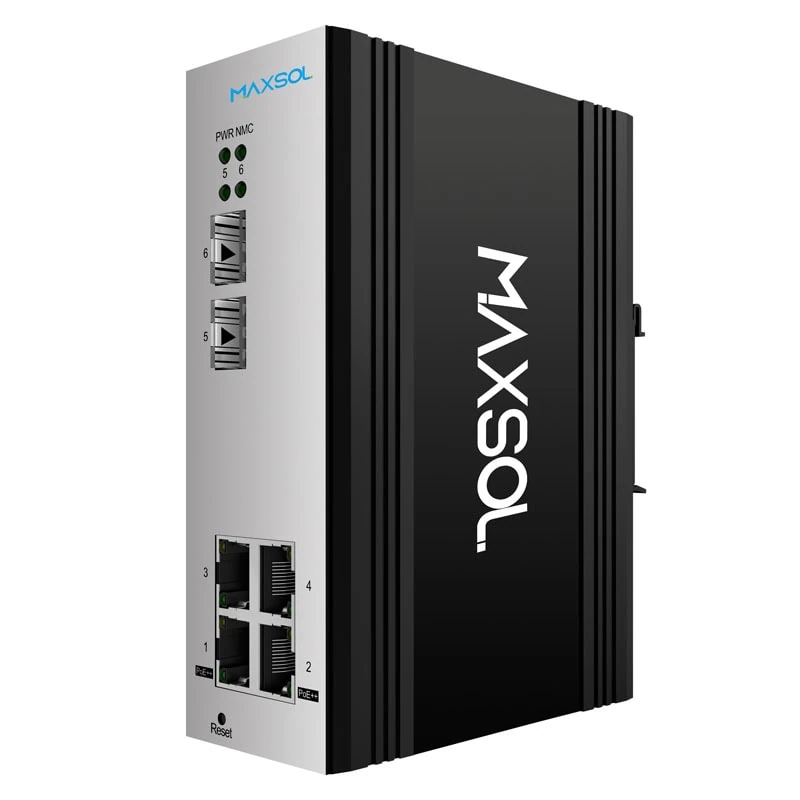
| PS2402SFG-I-BT | 4 Gigabit PoE ports | Ports 1–2 support IEEE 802.3bt up to 90W; all four ports support IEEE 802.3af/at | 2 SFP ports | Compact Gigabit deployment with one or two high-power endpoints |
| PS1802FE-HIB | 8 Fast Ethernet PoE ports | Ports 1–2 support IEEE 802.3af/at/bt up to 90W; ports 3–8 support IEEE 802.3af/at | 1 Gigabit and 2 SFP uplinks | Hardened DIN-rail layout where Fast Ethernet access speeds suit the endpoints |
The PS2802SFG-I-BT eight-port Gigabit managed industrial PoE switch is the more natural starting point where several cameras or wireless devices need Gigabit access connectivity, but only two endpoints need 90W-class power. Allocate the two high-demand devices to ports 1 and 2, then use the other six PoE ports for 802.3af/at devices.
The PS2402SFG-I-BT four-port Gigabit managed industrial PoE switch suits smaller cabinet, pole-box or local-network designs where two high-power devices are the maximum expected requirement. Its two SFP ports can be relevant where the uplink medium is fibre rather than copper.
For both models, confirm the total PoE budget, input supply requirements, switching and management features, environmental ratings, and the exact requirements of connected PDs before final specification. The documented per-port allocation tells you where high-power devices may be connected; it does not replace a full power-budget check.
Gigabit versus Fast Ethernet at the edge
Camera resolution, compression, frame rate and the number of devices sharing an uplink affect bandwidth requirements. A Fast Ethernet access port can be appropriate for some endpoints, but it should be selected deliberately rather than by default.
Consider Gigabit access ports where the endpoint, local traffic pattern or future expansion needs the extra headroom. Also assess the uplink: several cameras may each operate acceptably alone while collectively creating congestion towards the recorder, core switch or wireless backhaul.
Consider hardened unmanaged deployment
Not every field installation needs configuration features at the edge. In a simple, fixed topology, an unmanaged hardened switch can reduce commissioning steps, provided the design team has already planned power allocation, segmentation and uplink capacity elsewhere in the network.
The PS1802FE-HIB hardened industrial PoE switch has eight Fast Ethernet PoE ports, one Gigabit plus two SFP uplinks, and IP40 DIN-rail construction. Ports 3–8 support IEEE 802.3af/at, while ports 1–2 support IEEE 802.3af/at/bt up to 90W.
This allocation can work well when a field enclosure contains a mix of conventional PoE cameras and two devices needing higher available port power. Put the 90W-capable endpoints on ports 1 and 2 and reserve ports 3 to 8 for standard 802.3af/at devices.
There are limitations to consider before choosing this approach:
- Fast Ethernet access ports may not meet every high-bandwidth camera or wireless requirement.
- The documented 90W support should not be treated as a substitute for confirming the PD’s required powering method and standard compatibility.
- An unmanaged topology offers less local visibility and fewer traffic-control options than a managed one.
- IP40 describes the switch construction, not the protection rating of the complete cabinet or outdoor installation.
For a remote or solar-assisted site, the power design remains central. Calculate daytime generation, storage, low-light operation, switch load, endpoint peaks and any heating load separately. PoE can simplify distribution after the power source, but it does not reduce the energy the site must generate or store.
Pre-installation checklist
Use this checklist before ordering a 90W PoE++ 802.3bt switch or starting installation.
- List each powered device. Record make, model, maximum watts, required PoE standard and any peak-load accessories.
- Identify the true 90W requirement. Check whether the device needs 802.3bt Type 4 or merely has a large external power supply.
- Map high-power ports. Match each 60W- or 90W-class device to a specifically documented high-power switch port.
- Calculate aggregate demand. Add the maximum planned loads and compare the result with the switch’s stated PoE budget.
- Allow for delivery loss. Account for cable resistance and leave sensible operating margin, especially on long routes.
- Inspect the cable channel. Confirm four-pair, eight-conductor continuity from switch to endpoint, including patch leads and intermediate hardware.
- Avoid unsuitable cable materials. Verify conductor quality and condition; do not assume a cable is suitable based on category marking alone.
- Check input power. Size the upstream PSU, DC distribution, battery system or solar supply for switch consumption and worst-case PoE demand.
- Review bandwidth. Ensure access-port speeds and copper or fibre uplinks match the traffic generated by all endpoints.
- Plan protection and enclosure integration. Confirm earthing, surge protection, cable entry, environmental protection and maintenance access for the complete site.
- Document port assignments. Label the cabinet and keep the power and network schedule with project handover information.
- Test at full load. Commission devices under realistic conditions, including night mode, movement, heating or other peak-demand functions where relevant.
A 90W PoE++ 802.3bt switch is most valuable when it is selected as part of a complete power-and-network design, not as a universal replacement for PoE+. Compare the linked Maxsol models against your required port count, endpoint load, cable distance, input power source, environment and need for management before making a final specification.