How to Build Solar-Powered CCTV for Remote UK Sites
Plan solar-powered CCTV for a remote site, from survey and power budgeting to recording, wireless backhaul, protection and acceptance testing.
By Maxsol Team

To build a solar powered CCTV system for remote areas, start with the surveillance objective and site survey—not the panel size. Confirm camera coverage, year-round solar access, recording needs and a viable data route before selecting the battery, solar panel, converter, network equipment and enclosure.
A dependable installation treats surveillance, recording, communications and power as separate subsystems. Each interface must be checked, and the completed system should be tested at night, during a simulated power interruption and after communications have been restored.
Survey coverage and remote-site constraints
A remote CCTV survey must answer three questions: can the cameras capture useful evidence, can the site generate and store enough energy, and can recordings be retrieved reliably?
Begin by defining the surveillance outcome. Identifying a person at a gate requires a different field of view and image density from detecting movement along a boundary. Record the required scenes, target distances, operating hours, night conditions and how quickly an operator must receive footage or alerts.
Map the camera views before choosing hardware
For each proposed camera position, document:
- the area and subject that must be visible;
- mounting height and viewing direction;
- likely obstructions, including vegetation and parked machinery;
- sources of glare, headlights or backlighting;
- night-time illumination requirements;
- cable distance to the power and network enclosure;
- whether the mounting structure moves or vibrates;
- maintenance access without compromising safety.
Test the intended view from approximately the planned mounting position. A convenient pole is not automatically a useful camera location.
Assess year-round solar exposure
Inspect the solar-panel location throughout the expected operating period. Trees, buildings, masts and terrain can create shading that may not be obvious during a single daytime visit. Consider low winter sun, vegetation growth, accumulated dirt and the risk of future obstructions.
Do not proceed on the basis of nominal panel wattage alone. The survey should provide enough information to model the expected load, charging opportunity and required reserve for poor-weather periods.
Apply go/no-go checks
| Survey question | Go condition | No-go or redesign trigger |
|---|---|---|
| Camera coverage | Required subjects are visible at the necessary level of detail | Key areas are obscured or targets are too distant |
| Solar access | A practical panel position has suitable year-round exposure | Persistent shading cannot be removed or avoided |
| Mounting | Stable structures and safe maintenance access are available | Camera, radio or panel cannot be mounted securely |
| Backhaul | Line of sight, cellular service or local retrieval is viable | No dependable data route meets the operational need |
| Power equipment | Loads and interfaces can be documented | Camera, recorder or radio consumption is unknown |
| Environment | Enclosure, cable and protection strategy suit the location | Water entry, temperature or impact risks cannot be controlled |
| Permissions | Landowner, planning, privacy and radio requirements can be addressed | Required approval or lawful operation cannot be established |
A failed check does not always mean abandoning the site. It may mean changing the camera position, using local recording instead of continuous remote video, creating an intermediate wireless link, or selecting a more appropriate power architecture.
Choose recording and backhaul architecture
Recording and backhaul are separate decisions. A site can record locally while sending only health data and event alerts, or it can transmit continuous video to a recorder elsewhere. The best arrangement depends on evidence retention, service availability, bandwidth and the consequences of a communications outage.
| Architecture | Main advantage | Main limitation | Appropriate when |
|---|---|---|---|
| Camera-based local storage | Low network demand and few components | Media must be protected and may require site visits | Occasional evidence retrieval is acceptable |
| Local network recorder | Centralises recordings from several cameras | Adds continuous power demand and enclosure space | Multiple cameras need coordinated retention |
| Point-to-point wireless backhaul | Can avoid recurring cellular data use | Requires a suitable radio path and correctly aligned equipment | Another powered network location is within a viable path |
| Cellular backhaul | Does not require a nearby fixed network endpoint | Coverage, data allowance and modem behaviour must be verified | Suitable mobile service is available at the exact mounting point |
| Hybrid local and remote recording | Preserves local evidence during backhaul failure | More configuration and storage management | Loss of the communications link must not stop recording |
Cameras, recorders, storage media, cellular modems and subscriptions should not be assumed to be included with a solar power system or wireless bridge. Specify them separately and verify power, network and environmental compatibility.
Local recording
Local recording reduces the energy and bandwidth needed for continuous transmission. It is often useful where the primary requirement is post-incident evidence rather than live monitoring.
Check:
- recording capacity at the intended resolution and frame rate;
- overwrite behaviour when storage is full;
- retention following an unexpected shutdown;
- access control and physical protection;
- time synchronisation;
- whether health and storage-failure alerts can still be sent remotely.
Local storage is not a substitute for acceptance testing. Retrieve sample footage rather than relying on a recording status icon.
Point-to-point wireless backhaul
A directional bridge requires more than visual line of sight. Survey the complete path, mounting stability, nearby interference, channel options, cable runs and the clearance around the radio path. Verify applicable UK radio rules before commissioning.
The Maxsol CPE295 5.8GHz wireless CPE documents 5.8GHz operation, a 2×2 14dBi directional MIMO antenna, one Gigabit LAN port, IEEE 802.3af/at or 9–48V DC power support, and 6.5W full-load consumption. Product range and wireless-rate labels do not guarantee distance or application throughput. Confirm line of sight, interference, local spectrum requirements and the usable throughput needed by the selected video settings.
Cellular backhaul
A phone showing signal near the site is not sufficient evidence. Test the intended modem, antenna location, network and installation height. Evaluate upload performance and connection recovery at different times rather than checking signal bars alone.
Where bandwidth or data use is constrained, consider local recording with event clips, still images and health monitoring instead of continuous high-bitrate video. Confirm how the modem behaves after low-voltage shutdown, network loss and power restoration.
Establish the complete power budget
The power budget must include every load operating from the battery, not only the cameras. List each device’s voltage, normal consumption, worst-case consumption, duty cycle and start-up behaviour.
Typical loads include:
- cameras, including infrared illumination, heaters or illuminators where fitted;
- local recorders and storage devices;
- Ethernet switches;
- wireless bridges or access points;
- cellular modems and routers;
- DC-to-DC or DC-to-PoE converters;
- enclosure ventilation, heating or control equipment;
- auxiliary sensors and relays.
Night-time camera consumption can be higher than daytime consumption when infrared LEDs or other illumination is active. Wireless and cellular equipment may also draw variable power during heavy traffic or reconnection.
Separate continuous and intermittent loads
Calculate continuous loads over 24 hours. Then account for intermittent equipment according to realistic operating time. Allow for conversion losses, cable losses and system overhead rather than treating the battery’s nominal watt-hours as fully deliverable energy.
For example, as a hypothetical design assumption rather than measured product performance, two cameras at 8W each, a recorder at 10W and a radio at 7W create a 33W continuous load. That represents 792Wh per day before conversion losses, reserve margin and environmental derating. The figures for the actual selected devices must replace these assumptions.
Avoid selecting a solar kit merely because its nominal battery watt-hours resemble the calculated daily energy. Battery operating limits, low-voltage cut-off, charging conditions, panel yield and required outage reserve all affect the design.
Use the detailed off-grid solar sizing guide for CCTV systems to convert the verified equipment schedule into panel, battery and autonomy requirements rather than relying on a generic calculator or nameplate comparison.
Specify solar storage and power interfaces
Once the load and autonomy requirement are established, select the solar and battery system. Verify the controller’s permitted photovoltaic voltage, current and power, as well as the battery’s charging temperature limits and protection behaviour in the current datasheet and supplied configuration.
The Maxsol CS12060 120W and 768Wh solar power system documents a 120W monocrystalline panel, a 12.8V 60Ah 768Wh LiFePO4 battery, an MPPT controller and three DC12V outputs. RS485 is optional. These are nominal component specifications: 768Wh is not the same as usable energy delivered to the CCTV loads, and the configuration does not establish a universal autonomy period or 24/7 operating guarantee.
Verify every voltage and protocol boundary
Create an interface schedule before ordering equipment:
| Connection | Checks required |
|---|---|
| Solar panel to controller | PV voltage, current, power limit, connector and polarity |
| Controller to battery | System voltage, protection, fuse and charging-temperature limits |
| Battery or controller to DC load | Output voltage range, current capacity and low-voltage behaviour |
| DC source to PoE converter | Accepted input range, polarity, cable loss and fuse rating |
| PoE converter to device | Output voltage, power, pinout, protocol and powered-device compatibility |
| Camera to switch or radio | Ethernet speed, PoE requirement, surge protection and cable distance |
| Radio to remote network | Throughput, addressing, security and recovery after link loss |
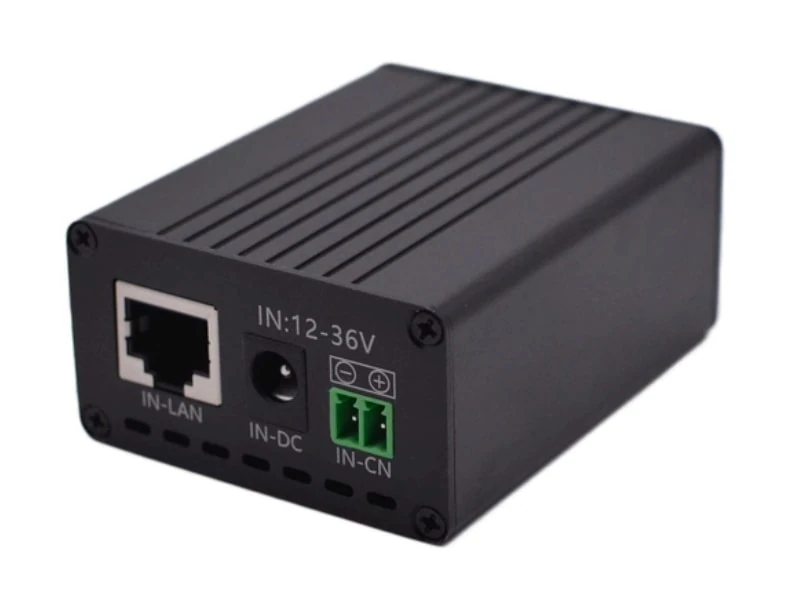
A DC-to-PoE converter does not automatically make every camera or radio compatible. The Maxsol POE24V DC-to-PoE converter accepts 12–36V DC and provides adjustable 12–57V PoE output, Gigabit Ethernet and an LCD voltage display. Its documented continuous load when converting 12V to 48V is no more than 30W. The stated conversion efficiency of up to 94% is a maximum, not a value that should be assumed for every design condition.
IEEE powered-device detection or negotiation is not established by those facts. Verify voltage, polarity, pinout, protocol and power compatibility with the connected device. An incorrect setting can damage equipment even when the connector fits.
The CS12060, POE24V and CPE295 should be treated as separate selection examples, not as a tested compatible bundle. Check each interface and the current documentation for the supplied configuration.
Plan mounting, cabling and protection
Mechanical and electrical installation decisions have a direct effect on reliability. Position the panel for solar exposure without allowing it to shade the camera or radio. Mount cameras for the required view and place directional radios where their alignment will remain stable.
Keep external cable runs short where practical, but do not compromise camera coverage or radio clearance merely to save cable. Use cable and connectors intended for the environment, form drip loops and seal enclosure entries correctly.
Design the outdoor enclosure as a system
The enclosure may need to accommodate the controller, battery, converter, switch, recorder, fuses, surge protection and cable terminations. Allow space for safe wiring, heat dissipation and maintenance rather than filling the enclosure to capacity.
The outdoor PoE switch box and power design guide explains how to coordinate power, fibre, battery, enclosure and switching decisions when several network components share an outdoor cabinet.
The installation plan should address:
- enclosure ingress protection appropriate to the exposure;
- internal temperature and battery charging limits;
- segregation of power and data wiring where necessary;
- cable strain relief and bend radius;
- correctly rated overcurrent protection;
- isolation for safe maintenance;
- earthing and surge-protection strategy;
- tamper resistance and controlled access;
- labelling of voltages, fuses and disconnect points.
Long copper Ethernet runs between outdoor structures can introduce surge and earthing risks. Where fibre is selected to provide electrical separation, remember that media converters or fibre switches create additional power loads that must appear in the energy budget.
Follow the equipment manufacturers’ installation instructions and use competent electrical or network personnel where the power, earthing, working-at-height or site conditions require them.
Commission night operation and outage recovery
Commissioning should demonstrate that the installation meets the agreed surveillance requirement, not simply that devices power on. Test under the conditions most likely to expose weaknesses, including darkness, maximum expected network traffic and recovery from interrupted power.
Perform a structured acceptance test
- Confirm the physical installation. Record camera direction, radio alignment, panel position, cable labelling, fuse ratings and enclosure layout.
- Verify each power interface. Measure or confirm input and output voltages, polarity and configured PoE output before connecting sensitive equipment.
- Check daylight video. Confirm coverage, focus, identification zones, timestamp and recording.
- Check night video. Inspect infrared exposure, reflections, motion blur, noise and image detail at the required target locations.
- Test recording retrieval. Export a sample clip from each camera or recording channel and verify that it opens with the correct date and time.
- Load-test the communications path. Confirm usable throughput and stability while the intended cameras are transmitting.
- Interrupt the backhaul. Verify that local recording continues and that queued alerts or health states behave as designed.
- Simulate a controlled power interruption. Confirm orderly shutdown where supported, low-voltage behaviour and automatic restart after power returns.
- Test outage recovery. Check that cameras, recorder, switch, radio and modem reconnect without manual intervention.
- Record final operating values. Capture battery and controller readings, device loads and link status as a baseline for future maintenance.
Do not perform a deep-discharge test that conflicts with battery or controller limits. Outage testing should be controlled and designed to verify recovery behaviour without damaging the storage system.
Retain acceptance evidence
A useful handover pack should contain:
- annotated coverage images from day and night tests;
- exported sample recordings;
- an equipment and interface schedule;
- configured voltage and network settings;
- measured or verified load information;
- wireless or cellular test results;
- the final cable and enclosure layout;
- commissioning dates and software versions;
- recovery-test results;
- maintenance access and isolation instructions;
- unresolved limitations or seasonal checks.
Common failures include sizing from camera wattage alone, assuming nominal battery capacity is fully usable, trusting a wireless range label, overlooking night-time load, and failing to test restart behaviour. Addressing these issues before handover is less costly than discovering them after several poor-weather days or a communications outage.
The practical next step is to compare the linked Maxsol models and other selected components against the project’s actual port count, load, transmission distance, input and output power, environmental conditions and management requirements. Confirm every interface in the current datasheets before treating the components as a complete system.