How to Design an Off-Grid PoE CCTV and Wireless Network
Plan an off-grid PoE CCTV and wireless network with correct voltage matching, backhaul power, load priorities, monitoring and restart testing.
By Maxsol Team

An off-grid PoE system for CCTV and wireless networks must be designed as one power-and-data chain. Count every camera, radio, switch and controller; match battery and switch voltages; power both ends of each wireless link; and test how the network behaves after a low-battery shutdown.
Continuous availability should be treated as a design objective rather than an assumed product feature. A credible 24/7 design accounts for night-time camera loads, poor solar conditions, backhaul failure, battery protection, restart order and the possibility that non-essential devices must be disconnected to preserve critical surveillance.
Define network services and availability targets
Start by defining what the remote network must continue doing when energy or bandwidth is limited. “Keep the CCTV online” is not precise enough: live viewing, local recording, event transmission and remote management have different dependencies.
Document these services separately:
| Service | Typical dependency | Suggested priority |
|---|---|---|
| Local camera recording | Camera, PoE switch and local recorder or storage | Critical |
| Intrusion or event alerts | Camera analytics, switch, backhaul and receiving platform | Critical |
| Remote live view | Complete camera-to-control-room path | High |
| Network monitoring | Switch or controller telemetry and backhaul | High |
| General wireless access | Access point, backhaul and internet service | Medium or low |
| Maintenance equipment | Temporary ports or local service connection | Low |
For each critical service, set an acceptance target. Useful questions include:
- Must every camera operate continuously, or can secondary views be shed?
- Is local recording acceptable during a backhaul outage?
- How long may remote access be unavailable after a restart?
- Must event alerts be preserved before general live viewing?
- Is a short daily interruption acceptable?
- How many sunless or low-generation periods must the design tolerate?
- Can an engineer visit the site after a complete battery shutdown?
Do not equate a battery’s nominal watt-hour rating with usable delivered energy. Conversion losses, switch consumption, cable losses, battery protection settings, temperature and allowable depth of discharge all affect autonomy. There is no universal runtime or 24/7 guarantee based on the battery label alone.
Detailed energy calculations should be completed separately for the actual device list. The guide to calculating a PoE power budget for security cameras explains how to total port demand without confusing device consumption, switch capacity and available solar energy.
Draw the camera, radio and backhaul topology
Draw both the data path and the power path before selecting equipment. This reveals loads that are easily missed, especially the far-end radio, intermediate relay nodes and equipment not powered by PoE.
A common two-site topology may contain:
- Remote surveillance node: solar array, charge controller, battery, protected power distribution, PoE switch, four IP cameras and a directional backhaul radio.
- Wireless path: a point-to-point connection between the remote node and a building, mast or second off-grid location.
- Backhaul endpoint: a second radio with its own PoE source or DC supply.
- Receiving network: router, recorder, monitoring server or internet connection.
- Management path: switch, controller and radio interfaces used to diagnose the site remotely.
The remote network is only reachable while both backhaul endpoints are powered and associated. Supplying the camera-side radio does not keep the link operational if the receiving radio loses power. If the far end is also off-grid, it needs a separate energy budget, battery strategy and restart test.
Example simultaneous port demand
The following is a hypothetical planning example, not measured product performance:
| Connected load | Quantity | Assumed input per device | Simultaneous port load |
|---|---|---|---|
| Fixed IP cameras | 4 | 8W | 32W |
| Directional backhaul radio | 1 | 6.5W | 6.5W |
| Auxiliary sensor or intercom | 1 | 10W | 10W |
| Illustrative connected load | 48.5W |
This figure is not the complete site demand. Add the switch’s own consumption, controller losses, any DC converters, heaters, local recorder, auxiliary networking and cable loss. Use each device’s documented maximum or worst operating mode rather than its typical daytime figure.
Night operation can change the result. Cameras may enable infrared illumination, radios may maintain high traffic, and heating or environmental controls may activate. Ports must also support the required PoE standard and any start-up or peak demand, not merely the average wattage.
Check application throughput, not just link labels
Bandwidth planning should use the combined peak traffic expected across the backhaul.
As a hypothetical assumption, four cameras averaging 4Mbit/s each would create 16Mbit/s before protocol overhead, viewing traffic, retransmissions or bitrate peaks. Simultaneous remote viewing, firmware transfers and secondary streams can increase demand.
Confirm:
- camera codec, frame rate, resolution and bitrate configuration;
- average and peak aggregate traffic;
- whether footage is recorded locally or transported continuously;
- actual application throughput in the installed radio environment;
- latency and packet loss acceptable to the recorder or monitoring platform;
- available Ethernet interface speed at every hop;
- line of sight, Fresnel-zone clearance and likely interference.
The Maxsol CPE295 directional wireless CPE documents 5.8GHz operation, a 2×2 14dBi directional MIMO antenna, one Gigabit LAN port, IEEE 802.3af/at or 9–48V DC power support, and 6.5W full-load consumption. Product range and wireless rate labels do not guarantee installed distance or application throughput. Survey the path and confirm interference, alignment and applicable UK radio requirements.
Match switch, battery voltage and per-port interfaces
Voltage compatibility is a mandatory selection check. A battery’s nominal voltage, a controller’s output voltage and a switch’s accepted input range are not interchangeable merely because all three products are described as suitable for solar applications.
The Maxsol CS12060 120W, 60Ah solar power system documents a 120W monocrystalline panel, a 12.8V 60Ah 768Wh LiFePO4 battery, an MPPT controller and three DC12V outputs, with RS485 optional. These are nominal or documented interface details, not a statement of usable autonomy.
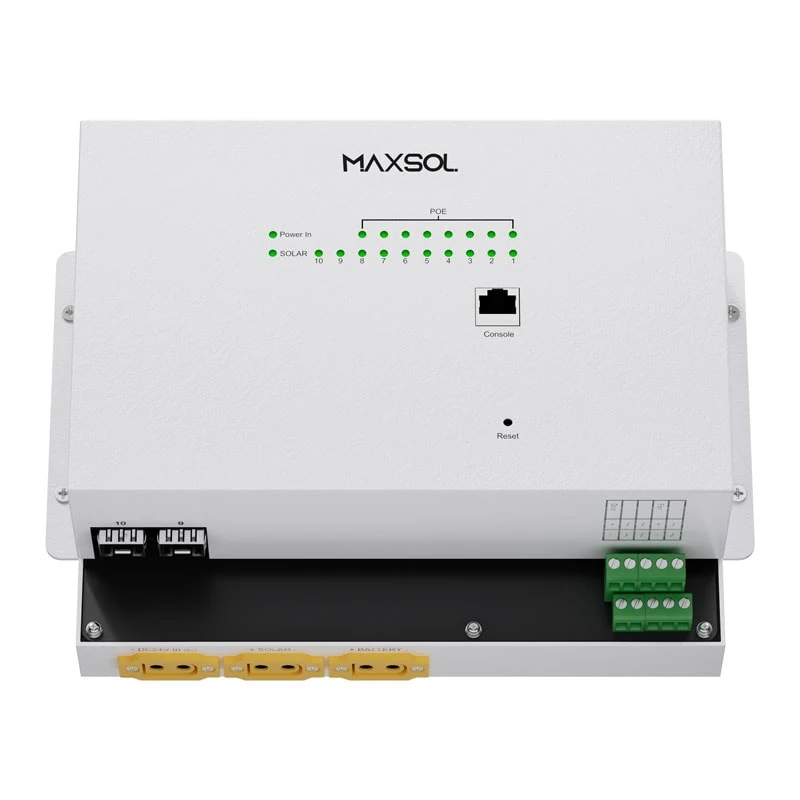
The Maxsol IOT2802SFG-S managed solar industrial PoE switch documents eight Gigabit PoE ports, two SFP ports, a 120W PoE budget, 90W BT support, PV and battery monitoring, and PV and battery input at DC22–29.2V. It also documents configurable 24V or 48V PoE on ports 3–4.
These two linked products are alternative architecture examples, not a tested compatible bundle. In particular, a 12.8V battery or 12V output must not be connected directly to a switch that requires DC22–29.2V.
Before purchase or installation, verify:
- the switch’s complete PV and battery input ranges;
- whether the selected controller provides a regulated and protected compatible output;
- controller limits for PV voltage, current and power;
- battery chemistry, nominal voltage and permitted charging profile;
- low-voltage cut-off and recovery thresholds;
- charging temperature limits and battery protection behaviour;
- cable size, connector polarity, fusing and isolation;
- PoE standard and pin/interface requirements for every endpoint;
- actual allocation and configuration of special-output ports;
- SFP module and fibre compatibility where fibre is used.
A voltage converter may appear to solve a mismatch, but it introduces its own input range, efficiency, thermal, start-up and low-voltage behaviour. Include it as a load and test it across the expected battery voltage range. Do not assume a converter will restart cleanly after battery protection trips.
Managed or unmanaged switching
A managed switch is generally more useful at an unattended solar site when the required functions include port status, traffic visibility, remote configuration or controlled port recovery. An unmanaged switch may be appropriate for a small, accessible installation where simplicity is more important and external monitoring is available.
The practical differences are covered in managed versus unmanaged PoE switch selection. Management features do not correct an undersized energy system, incompatible voltage or unreliable radio path, but they can make diagnosis and recovery more controlled.
Plan monitoring, load priority and recovery
Monitoring should show whether a fault begins in the solar supply, battery, PoE port, camera or backhaul. A simple “site offline” alarm cannot identify which part failed.
Where supported by the selected hardware and system architecture, consider monitoring:
- PV input voltage and current;
- battery voltage and charge or protection state;
- switch input and internal status;
- PoE port state and reported load;
- camera reachability;
- radio association, signal quality and Ethernet status;
- packet loss, latency and backhaul throughput;
- enclosure temperature or other relevant environmental conditions;
- time since the last successful status update.
Confirm how monitoring data reaches the operator. If it depends on the same wireless backhaul being monitored, the final message before a failure may be the only evidence available. Local event logs or controller history can therefore be useful during a site visit.
Assign loads to priority groups
Prioritisation prevents a secondary service from exhausting the remaining battery energy needed by critical cameras and communications.
A practical order could be:
- Critical communications: primary backhaul radio and essential network control.
- Critical surveillance: priority cameras and local recording.
- Operational monitoring: controller and switch telemetry.
- Secondary surveillance: overview or low-priority cameras.
- Convenience loads: public Wi-Fi, maintenance ports or auxiliary lighting.
The actual order depends on the application. For example, preserving cameras without the backhaul may be sensible if recording is local. If there is no local storage and the principal requirement is immediate alarms, retaining the backhaul may take precedence.
Decide what performs the load shedding: switch configuration, controller outputs, relays, an external management platform or manual intervention. Verify that the chosen method does not disconnect the very management path required to restore service.
Define acceptable recovery behaviour
A complete restart is not automatically successful just because all indicators eventually illuminate. Define acceptance criteria such as:
- power returns without manual intervention;
- controller and switch start without repeated cycling;
- the backhaul establishes within an agreed period;
- critical cameras obtain network connectivity;
- local recording resumes;
- event transmission is restored;
- the management platform recognises the site;
- non-critical ports remain off until the battery reaches the chosen recovery threshold.
Avoid rapid on/off cycling near the low-voltage threshold. Where configurable, use suitable separation between shutdown and restart levels, plus staged restoration or delay timers. Confirm these behaviours with the actual controller, battery protection system, switch and attached devices.
Validate night operation and restart behaviour
Commission the system under realistic load rather than testing each component separately on a bench. The installed cables, connectors, enclosure, radio alignment and camera night modes all affect the result.
A practical commissioning sequence is:
- Inspect the power architecture. Check polarity, protective devices, isolation, earthing arrangements where applicable, cable sizing and connector security.
- Confirm voltage compatibility. Measure and record controller, battery and switch voltages before connecting network loads.
- Start the network in stages. Power the switch first, then the backhaul, critical cameras and secondary loads. Observe inrush and stability.
- Check every PoE interface. Confirm that the correct standard or configured output is assigned to each port.
- Apply simultaneous traffic. Stream or record all cameras while running remote monitoring and expected backhaul traffic.
- Verify the radio path. Record alignment, signal indicators, packet loss, latency and practical throughput under representative conditions.
- Trigger camera night mode. Confirm port consumption and stability with infrared or other night functions active.
- Simulate a backhaul outage. Verify local recording, alert handling and recovery when the link returns.
- Simulate a low-energy response. Use safe, controlled methods to test load shedding and controller thresholds without damaging the battery.
- Perform a cold restart. Remove and restore power according to the equipment instructions, then verify the complete service chain.
- Test remote recovery. Disable and restore an appropriate non-critical PoE port to confirm that management access and logs behave as expected.
- Run an observation period. Review voltage trends, port loads, radio stability and overnight behaviour before formal handover.
Do not deliberately bypass battery protection or discharge a battery beyond its documented limits to accelerate testing. If a full low-battery test is impractical, test the control logic separately and record what remains unverified.
Environmental suitability also needs confirmation from current datasheets. Check the specified operating temperatures, ingress protection or enclosure requirements, humidity limits, surge protection, mounting method and battery charging restrictions for the actual installation. Do not assume every component described as industrial or solar-ready can be mounted unprotected outdoors.
Handover and maintenance checklist
A remote network is easier to support when the handover pack records the intended design rather than only listing model numbers.
Include the following:
- Site diagram showing cameras, switch ports, radios, fibre links and power paths
- Equipment schedule with current datasheets and supplied configurations
- Battery chemistry, nominal voltage and protection settings
- PV module and controller limits
- Switch input range and total PoE budget
- Port-by-port PoE mode, priority and expected load
- Camera addresses, roles and recording destinations
- Radio addresses, alignment records and channel settings
- Backhaul bandwidth assumptions and commissioning results
- Monitoring endpoints, alert recipients and escalation process
- Low-energy load-shedding order
- Shutdown and restart thresholds
- Expected recovery sequence and maximum acceptable interruption
- Configuration backups and controlled access credentials
- Fuse, cable, connector and spare-part details
- Inspection schedule for panels, mounts, cabinets, cables and seals
- Record of unresolved risks or untested operating conditions
Maintenance should include physical and operational checks. Inspect panel shading and condition, cable damage, loose mounts, enclosure seals, corrosion, battery or controller warnings and changes to the wireless path. Review historical logs for declining generation, repeated restarts, increasing packet loss or PoE ports operating unusually close to their limits.
Recalculate the design whenever cameras, radios or auxiliary equipment are added. A spare Ethernet port is not necessarily spare power, battery capacity, bandwidth or solar generation.
The next step is to compare the linked Maxsol solar system, managed solar PoE switch and wireless CPE examples against the project’s actual port count, simultaneous load, link distance, input voltage, environmental protection and management requirements. Confirm current datasheets and supplied configurations before treating any models as electrically or operationally compatible.